LT 2.3
On your WordPress blog:
- Write a summary about the importance of organising your content and assets (images, logos, icons, graphics and text). Then, take a screenshot of your folder structure to show how you organised your content for this website project. Note that these files need to be organised before you start building your website in Webflow.
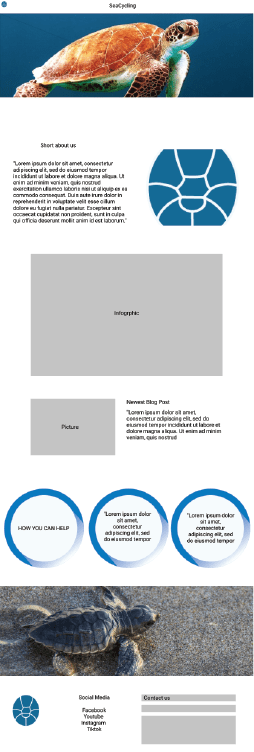
- Take screenshots of your Home Page in your Figma prototype and then of your Webflow Home Page to show how you’re moving along. Please write a short comparison of the two and how hard or easy it was to build what you have planned.
Write a summary about the importance of organising your content and assets (images, logos, icons, graphics and text). Then, take a screenshot of your folder structure to show how you organised your content for this website project. Note that these files need to be organised before you start building your website in Webflow.
It is important to keep my files organized so that they don’t get lost. I organize it by the type of file in different folders so that it’ll be easier to know where to look when I need the different elements.
Take screenshots of your Home Page in your Figma prototype and then of your Webflow Home Page to show how you’re moving along. Please write a short comparison of the two and how hard or easy it was to build what you have planned.
Figma Prototypes for web and phone

LT 2.4
On your website blog:
- As you did in Lesson Task 2.3, show screenshots of the page/s you are building in Webflow next to the matching page of your Figma prototype. Then, briefly write about how you’re experiencing Webflow. Share what you’re enjoying and what you find challenging.
I sadly havent gotten started in Webflow yet due to health issues but will be right on that as soon as i can.
As for how i am experiencing webflow so far, it is very unfammiliar for me, and im following toturials as best i can to learn it. However i must say i do prefer to code my own websites. I feel a better sense of control then for what i am doing.
 stinesreflectivejournal.art.blog